
Advanced Traffic Management Guide K/KA/KB.15.15
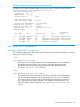
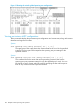
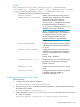
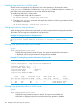
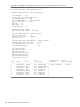
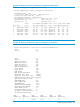


Example 82 Viewing spanning tree configuration information for a single port
HP Switch(config)#: show spanning-tree 2
Multiple Spanning Tree (MST) Information
STP Enabled : Yes
Force Version : MSTP-operation
IST Mapped VLANs : 1-4094
Switch MAC Address : 0024a8-d13a40
Switch Priority : 32768
Max Age : 20
Max Hops : 20
Forward Delay : 15
Topology Change Count : 1
Time Since Last Change : 58 mins
CST Root MAC Address : 001083-847000
CST Root Priority : 0
CST Root Path Cost : 60000
CST Root Port : 1
IST Regional Root MAC Address : 0024a8-d13a40
IST Regional Root Priority : 32768
IST Regional Root Path Cost : 0
IST Remaining Hops : 20
Root Guard Ports :
Loop Guard Ports : 2
TCN Guard Ports :
BPDU Protected Ports :
BPDU Filtered Ports :
PVST Protected Ports :
PVST Filtered Ports :
| Prio | Designated Hello
Port Type | Cost rity State | Bridge Time PtP Edge
------ --------- + --------- ---- ------------ + ------------- ---- --- ----
2 100/1000T | Auto 128 Inconsistent |
Troubleshooting an MSTP configuration
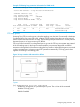
This section describes the show spanning-tree commands to use to monitor, troubleshoot, and
debug the operation of a multiple-instance spanning tree configuration in a network.
The show spanning-tree commands described in this section allow for focusing on increasingly
specific levels of operation. For example, you can display debug information for:
• All MST instances
• All ports used in one MST instance
• A specific port or several ports used in one MST instance
Also, you can display the change history for the root (bridge) switch used as the single forwarding
path for:
• All MST regions, STP bridges, and RSTP bridges in an STP network
• All VLANs on MSTP switches in a region
• All VLANs on MSTP switches in an mst instance
110 Multiple instance spanning tree operation