
Advanced Traffic Management Guide K/KA/KB.15.15


Viewing the change history of root bridges
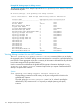
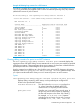
The show spanning-tree root-history command allows you to display change history
information (up to 10 history entries) for a specified root bridge in any of the following MSTP
topologies:
• Common Spanning Tree (cst):
Provides connectivity in a bridged network between MST regions, STP LANs, and RSTP LANs.
• Internal Spanning Tree (ist):
Provides connectivity within an MST region for VLANs associated with the default Common
and Internal Spanning Tree (CIST) instance in your network (VLANs that have not been mapped
to an MST instance).
• MST Instance (mst):
Connects all static and (from release 13.X.X ) dynamic VLANs assigned to a multiple spanning
tree instance.
Syntax:
show spanning tree root-history [ cst | ist | mst ] instance-id
Displays the change history for the root bridge in the specified MSTP topology.
cst Displays the change history for the root bridge of a
spanning tree network, including MST regions and STP
and RSTP bridges.
ist Displays the change history for the root bridge in the IST
instance of an MST region.
mst instance-id Displays the change history for the root bridge in an MST
instance, where instance-id is an ID number from 1
to 16.
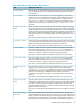
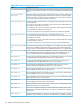
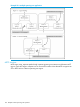
Use the show spanning-tree root-history command to view the number and dates of
changes in the assignment of a root bridge. Possible intrusion into your MST network may occur
if an unauthorized external device gains access to a spanning tree by posing as the root device
in a topology. To prevent an MST port connected to the device from being selected as the root
port in a topology, use the spanning-tree root-guard command.
Troubleshooting an MSTP configuration 111