
Advanced Traffic Management Guide K/KA/KB.15.15
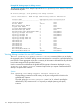
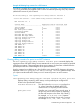

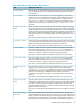
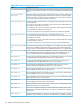

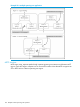

Example 89 Viewing bug counters for a CIST instance
The following example shows sample output of the show spanning-tree debug-counters
instance command when applied to the Common and Internal Spanning Tree (CIST) instance
(default MST instance 0) in the network.
HP Switch(config)#: show spanning-tree debug-counters instance 0
Status and Counters - CIST Common Debug Counters Information
MST Instance ID : 0
Counter Name Aggregated Value Collected From
--------------------------------- ---------------- --------------
Invalid BPDUs 0 Ports
Errant BPDUs 172603 Ports
MST Config Error BPDUs 0 Ports
Looped-back BPDUs 0 Ports
Starved BPDUs 0 Ports
Exceeded Max Age BPDUs 0 Ports
Exceeded Max Hops BPDUs 0 Ports
Topology Changes Detected 1 Ports
Topology Changes Tx 3 Ports
Topology Changes Rx 2 Ports
Topology Change ACKs Tx 0 Ports
Topology Change ACKs Rx 0 Ports
TCN BPDUs Tx 0 Ports
TCN BPDUs Rx 0 Ports
CFG BPDUs Tx 0 Ports
CFG BPDUs Rx 0 Ports
RST BPDUs Tx 0 Ports
RST BPDUs Rx 0 Ports
MST BPDUs Tx 5 Ports
MST BPDUs Rx 172577 Ports
Viewing debug counters for ports in an MST instance
The show spanning-tree debug-counters instance ports command displays the
aggregate values of all MSTP debug counters maintained on one or more ports used by a specified
spanning tree instance. These aggregate values are a summary of information collected from the
specified ports that have VLANs assigned to the specified instance.
Use this command to troubleshoot at a finer level the more general MSTP diagnostic information
displayed in the show spanning-tree debug-counters instance command output, when
you suspect unauthorized MSTP activity on one or more MST ports in an MST instance.
Syntax:
show spanning-tree debug-counters instance instance-id ports port-list
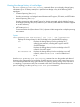
Displays debug counters for MSTP activity on the specified ports configured for
VLANs in the specified MST instance.
instance instance-id The valid values for instance-id are from 0 to
16, where 0 specifies the default MST (CIST)
instance and 1 to 16 specify an MST instance.
ports port-list Specifies one or more MST ports or trunk ports. In
the port list, enter a series of ports by separating
the first and last ports in the series with a dash (-);
for example, a2-a8 or trk1-trk3. Separate
individual ports and series of ports with a comma;
for example, a2-a8, a20, trk1, trk4-trk5.
Troubleshooting an MSTP configuration 115