
Advanced Traffic Management Guide K/KA/KB.15.15

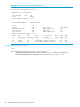
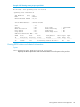

Example 102 Before configuring loop guard
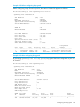
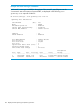
Before configuring Loop Guard on port 20, the status of VLAN 20 appears as follows:
HP Switch(config)#: show spanning-tree vlan 20
Spanning Tree Information
STP Enabled [No] : Yes
Mode : RPVST
Extended System ID : Enabled
Ignore PVID Inconsistency : Disabled
Switch MAC Address : 002347-c651c0
VLAN ID : 20
RPVST Enabled : Enabled
Root MAC Address : 0024a8-d13a40
Root Priority : 32,768
Root Path Cost : 20,000
Root Port : 1
Operational Hello Time (secs) : 2
Topology Change Count : 2
Time Since Last Change : 9 secs
Designated
Port Type Cost Priority Role State Bridge
----- ---------- ------ --------- ---------- ---------- ---------------
1 100/1000T 20000 128 Root Forwarding 0024a8-d13a40
20 10/100TX 200000 128 Alternate Blocking 002347-587b80
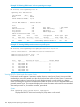
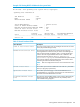
Example 103 After configuring loop guard
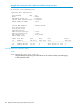
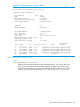
By executing spanning-tree 20 loop-guard, loop guard has been configured on port 20
of Switch 2:
HP Switch(config)#: show spanning-tree
Spanning Tree Information
STP Enabled [No] : Yes
Mode : RPVST
Extended System ID : Enabled
Ignore PVID Inconsistency : Disabled
RPVST Enabled VLANs : 20
Switch MAC Address : 002347-c651c0
Root Guard Ports :
Loop Guard Ports : 20
TCN Guard Ports :
BPDU Protected Ports :
BPDU Filtered Ports :
Auto Edge Ports : 1-24
Admin Edge Ports :
VLAN Root Mac Root Root Root Hello
ID Address Priority Path-Cost Port Time(sec)
----- --------------- ---------- ---------- -------------------- ---------
100 0024a8-d13a40 32,768 20,000 1 2
Configuring STP loop guard 141