
Advanced Traffic Management Guide K/KA/KB.15.15
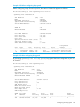
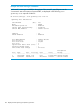

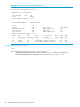
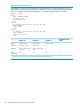

Example 110 Viewing BPDU status in show spanning tree output
HP Switch#: show spanning-tree 22
Spanning Tree Information
STP Enabled [No] : Yes
Mode : RPVST
RPVST Enabled VLANs : 10,20
Switch MAC Address : 0024a8-d13a40
Port : 22
Status : Up Port Type : 100/1000T
BPDU Protection : No BPDU Filtering : No
Root Guard : No TCN Guard : No
Loop Guard : No Admin Edge Port : No
Admin PointToPoint MAC : Yes
VLAN Port Port Port Designated Hello Oper Oper
ID Path-Cost Priority State Bridge Time Edge PtP
------ ---------- --------- ---------- ------------- ----- ----- ------
20 20000 128 Forwarding 0024a8-d13a40 2 No Yes
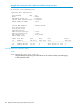
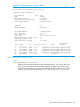
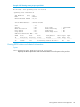
Example 111 Viewing BPDU protection status on specific ports
HP Switch#: show spanning-tree bpdu-protection 11-12,21-24
Status and Counters - STP BPDU Protection Information
BPDU Protection Timeout (sec) : 60
BPDU Protected Ports : 23-24
Port Type Protection State Errant BPDUs
------ --------- ---------- ----------------- ------------
11 100/1000T No 0
12 100/1000T No 0
21 100/1000T No 0
22 100/1000T No 0
23 100/1000T Yes 0
24 100/1000T Yes 0
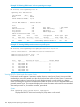
Viewing RPVST+ VLAN and vPort system limits
Each switch model supports a maximum number of active virtual ports (vPorts). New port VLAN
memberships cannot be created once the vPort limit has been reached. Also, there is a maximum
recommended number of active vPorts for each fixed-port switch or each module in a chassis
switch. Exceeding the maximum recommended number of vPorts can result in dropped BPDUs and
potential network loops. This command displays the current vPort status and maximum recommended
vPort total per-switch or, for modular switches, per-module.
Syntax:
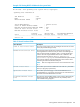
show spanning-tree system-limits rapid-pvst
Displays the RPVST+ VLAN and virtual port (vPort) status on the switch.
148 Rapid per-VLAN spanning tree (RPVST+) operation