
Advanced Traffic Management Guide K/KA/KB.15.15
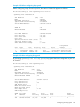
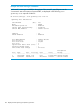

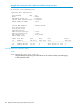
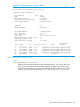
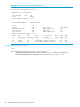
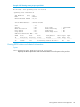
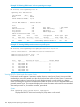
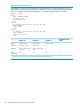

Example 112 Viewing RPVST+ VLAN and vPort system limits
HP Switch#: show spanning-tree system-limits rapid-pvst
Spanning Tree Information
STP Enabled : Yes
Mode : RPVST
RPVST Enabled VLANs : 20
Switch MAC Address : 002347-c651c0
Count of RPVST Enabled VLANs : 1
Maximum Allowed RPVST Enabled VLANs : 400
Count Of Total Virtual Ports : 24
Maximum Allowed Virtual Ports : 424
Current Operational Recommended Maximum
Ports Virtual Ports Virtual Ports Virtual Ports
-------------------- --------------- --------------- --------------------
Ports 1-24 24 2 200
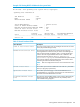
Table 12 Virtual Port Data Fields
DescriptionvPort data field
The count of active vPorts (ports per VLAN) plus the count of non-active
vPorts (all ports that belong to trunks).
Count of Total Virtual Ports
The total of the system-created vPort instances plus the maximum
user-assignable vPort instances. Each port on the switch belongs to at
Maximum Allowed Virtual Ports
least one VLAN (VLAN-1 by default), which is a system-created vPort
instance. The user-assigned VPORT instances are in addition to the
system-assigned vPort instances. The show spanning-tree
system-limits rapid-pvst command combines the system-created
vPort instances and the user-assigned maximum vPort instances when
calculating the maximum allowed virtual ports.
NOTE: Each user-configured trunk on the switch increments this value
by 1.
The number of ports that are members of each VLAN on a per-module
basis (or a per-group of ports basis).
Current Virtual Ports
The number of ports belonging to each PVST-enabled VLAN on a
per-module basis (or a per-group of ports basis). This value should not
exceed the recommended maximum vPort limit.
Operational Virtual Ports
The maximum recommended number of vPort instances that should be
allowed on the switch. Exceeding this limit can potentially result in
received BPDUs being dropped.
Recommended Maximum Virtual
Ports
Viewing RPVST+ statistics and configuration 149