
Advanced Traffic Management Guide K/KA/KB.15.15
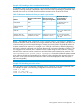
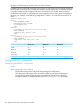

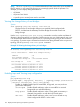
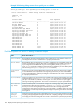

Example 114 Exceeding a vPort recommended maximum
In a modular switch, if the vPort count for a given module exceeds the recommended limit for that
module, a warning message is displayed in the CLI and an Event Log message is generated. Also,
the total vPort count on a switch cannot exceed the maximum vPort count for the switch.
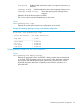
Table 13 Maximum VLANs and vPorts per-switch or per-module
Maximum vPorts per
Chassis Module or
Fixed-Port Switch
Maximum vPorts per
device (User-Assignable)
Maximum PVST-Enabled
VLANsPlatform
V1 Modules: 200 V2
Modules: 400
20004005400/8200
200.4004003500-24 6200-24
6600-24
Ports 1 - 24: 200 Ports 25
- 48: 200
4004003500-48
For each stack member:
Ports 1 - 24: 400 Ports 25
- 48: 400
2000(Same maximum for
standalone or stack.)
400(Same maximum for
standalone or stack.)
3800-24 3800-48
(Standalone or Stack)
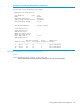
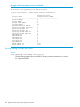
NOTE: The output of show spanning-tree system-limits rapid-pvst shows a
Maximum Allowed Virtual Ports value as a larger number than the values quoted in this table. This
is because each port on the switch belongs to at least one VLAN (VLAN-1 by default) and this is
a system created vPort instance. For example, on a 3500-24 in the factory default configuration,
the switch is already configured with 24 vPorts because all 24 ports are members of VLAN-1. The
user assigned vPort instances are in addition to these system assigned vPort instances, meaning
that 400 vPort instances can be created over and above the system-created vPort instances. The
show spanning-tree system-limits rapid-pvst command includes the system-created
vPort instances and the user-assignable vPort instances when calculating the maximum vPorts on
the switch. In the 3500-24 case, the maximum vPorts would be displayed as 424 (24 system +
400 user-assignable.)
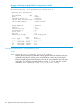
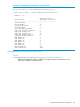
Example 115 Calculating non-active vPorts
Every port that is part of a manually configured trunk is counted as a non-active (reserved) vPort.
For example, the ports in the following configuration are all non-active vPorts:
trunk 1, 2 trk1
trunk 3-5 trk2 lacp
trunk 17-20 trk3 dt-lacp
Viewing RPVST+ statistics and configuration 151