
Advanced Traffic Management Guide K/KA/KB.15.15

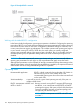
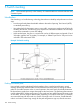


Figure 25 Sample RPVST+ network
Working with the default RPVST+ configuration
In the factory default configuration, spanning tree operation is disabled. Configuring the spanning
tree mode as RPVST+ on a switch and then enabling spanning tree automatically creates a spanning
tree instance for each VLAN on the switch. Configuration with default settings is automatic, and
in many cases does not require any adjustments. This includes operation with spanning tree regions
in your network running STP, MSTP, or RSTP. Also, the switch retains its currently configured
spanning tree parameter settings when spanning tree is disabled. Thus, if you disable, then later
re-enable spanning tree, the parameter settings will be the same as before spanning tree was
disabled.
CAUTION: The switch automatically senses port identity and type, and automatically defines
spanning tree parameters for each type, as well as parameters that apply across the switch.
Although these parameters can be adjusted, HP strongly recommends leaving these settings in their
default configurations unless the proposed changes have been supplied by an experienced network
administrator who has a strong understanding of RPVST+ operation.
Operating notes
Recommended application RPVST+ is ideal in networks having less than 100 VLANs. In
networks having 100 or more VLANs, MSTP is the
recommended spanning tree choice due to the increased load
on the switch CPU.
VLAN membership A port will be part of a given VLAN spanning tree only if the port is a
member of that VLAN.
RPVST+ interoperates with RSTP and
MSTP on VLAN 1
Because a switch running RPVST+ transmits IEEE spanning
tree BPDUs, it can interoperate with IEEE RSTP and MSTP
spanning tree regions, and opens or blocks links from these
regions as needed to maintain a loop-free topology with
one physical path between regions.
NOTE: RPVST+ interoperates with RSTP and MSTP only
on VLAN 1.
166 Rapid per-VLAN spanning tree (RPVST+) operation