
Advanced Traffic Management Guide K/KA/KB.15.15

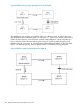
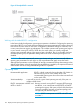


node A has traffic for node B, the assigned path between these nodes may be through switch 3 if
network conditions have changed significantly.
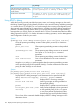
NOTE: The mac-age-time parameter determines how long an inactive path assignment remains
in memory. See the Basic Operations Guide for your switch.
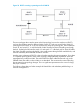
Because redundant paths are active, meshing adjusts quickly to link failures. If a link in the mesh
fails, the fast convergence time designed into meshing typically has an alternate route selected in
less than a second for traffic that was destined for the failed link.
Meshing allows scalable responses to increasing bandwidth demand
As more bandwidth is needed in a LAN backbone, another switch and another set of links can be
added. This means that bandwidth is not limited by the number of trunk ports allowed in a single
switch.
Preparing to configure switch meshing
Before configuring switch meshing:
1. Review the Operating Rules, particularly the restrictions and requirements for using switch
meshing in environments that include static trunks, multiple static VLANs, GVRP, IGMP, and
MSTP.
2. To avoid unnecessary system disruption, plan the mesh bring-up to minimize temporary port
blocking.
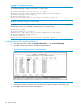
3. To view the current switch mesh status on the switch, use the CLI show mesh command.
Configuring switch meshing
Syntax:
[no] mesh [e] port-list [id 1...31 ]
Enables or disables meshing operation on the specified ports.
port-list Specifies the ports to be added or removed from a mesh.
id 1...31 Specifies the mesh ID. It must be unique; if two switches in a mesh
are assigned the same mesh ID, they auto-negotiate and generate
unique IDs. Only configured mesh IDs can be changed by a user.
NOTE: When the mesh ID is configured, a reboot is required for this ID to take
effect.
To view the mesh IDs, enter the show mesh id command.
The no mesh id command resets the configured mesh ID to zero.
Default: Mesh ID = 0
All meshed ports on a switch belong to the same mesh domain. To configure multiple meshed ports
on a switch, you need to:
1. Specify the ports you want to operate in the mesh domain.
2. Use write memory to save the configuration to the startup-config file.
3. Reboot the switch. For switches with redundant management modules, such as 8200zl switches,
you must reboot both management modules. Use the boot system … command.
Preparing to configure switch meshing 169