
Advanced Traffic Management Guide K/KA/KB.15.15
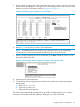




Configuring concurrent meshing and routing
Concurrent meshing and routing is only supported on the HP 5400 series and HP 8200 series
switches using these modules.
DescriptionModule
24-Port Gig-T PoE+ v2 zl ModuleJ9534A
20-Port Gig-T PoE+ / 4-port SFP v2 zl ModuleJ9535A
20-Port Gig-T PoE+ / 2-port 10-GbE SFP+ v2 zl ModuleJ9536A
24-Port SFP v2 zl ModuleJ9537A
8-Port 10-GbE SFP+ v2 zl ModuleJ9538A
24-Port 10/100 PoE+ v2 zl ModuleJ9547A
20-Port Gig-T / 2-port 10-GbE SFP+ v2 zl ModuleJ9548A
20-Port Gig-T / 4-port SFP v2 zl ModuleJ9549A
24-Port Gig-T v2 zl ModuleJ9550A
12-Port SFP / 12-port PoE+ v2 zl ModuleJ9637A
NOTE: Since concurrent meshing and routing is only supported on V2 modules, the no
allow-v1-modules configuration parameter must be set on switches that are configured for
meshing and routing.
Meshing and routing can be configured simultaneously. A packet can be routed into a mesh, or
be switched through a mesh and then routed. Two routers can be connected by mesh links, which
offers additional network topologies between routers and switches. Concurrent meshing and routing
makes it possible to implement meshing throughout a broadcast domain without the need for
additional switches or the use of another Layer 2 technology such as Spanning Tree to connect
meshing domains with routing switches.
It is important to remember that meshing provides Layer 2 load balancing only; two traffic streams
going to the same router will take the same path through the mesh as the traffic is going to the
same MAC address.
NOTE: The mesh port on a switch is tagged on all VLANs on that switch. It is recommended that
every meshed switch have the same VLANs, whether they are used or not.
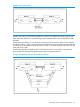
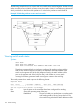
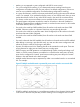
Meshing routers and switches
When Router A has no ports belonging to VLAN Z, the packets arriving on Router A’s non-mesh
ports at VLAN X can be routed to VLAN Y, travel through the mesh, and arrive at Router B. After
that they can be routed from VLAN Y to VLAN Z.
172 Switch meshing