
Advanced Traffic Management Guide K/KA/KB.15.15




adjacent switch and direct connection port on the
adjacent switch.
Not Established The port may be linked to a switch on a port that is
not configured for meshing or has gone down.
Initial The port has just come up as a meshed port and is
trying to negotiate meshing.
Disabled The port is configured for meshing but is not
connected to another device.
Error Error caused by external traffic that also happens to
be an apparent duplicate MAC address.
Topology Error Other sources of traffic may trigger a topology error,
but may be simply dropped.
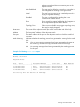
Hostname The name of the adjacent switch (the switch at the other end of the link).
Address The base MAC address of the adjacent switch.
Peer port The MAC address of the port on the adjacent switch to which the mesh link
connects.
Mesh Warning Indicates whether the meshing process has generated a warning for the mesh
link.
Yes One or more warning messages have been generated and written to
the event log. Use the show log command to see the warnings.
No No warning messages have been generated by the meshing process
for this port.
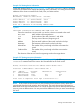
Example 134 Viewing show mesh output
North#: show mesh
Adjacent Hosts
Port State | Hostname Address Peer Port Mesh Warning
------ --------------- + -------- ------------- ------------- ------------
13 Established | East 001560-f9e300 001560-f9f3f3 No
14 Established | South 001f28-244a00 001f28-245ac3 No
15 Established | West 001279-884300 001279-8853f3 No
See the log file for details of warnings.
Viewing switch mesh status 175