
Advanced Traffic Management Guide K/KA/KB.15.15


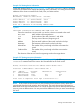


Example 136 Viewing device information
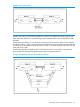
For the mesh topology shown in Example 135 (page 176), the show mesh mac-address command
issued from the North switch displays the following device information. This listing shows the MAC
addresses of the clients connected to the South, East, and West switches.
North#: show mesh mac-address
MAC Address VLAN Port Owner Switch Hostname
------------ ---- ---- ------------- ----------
001517-0bdc0c 1 14 001f28-244a00 South
001517-0bdc8d 1 13 001560-f9e300 East
000e0c-33b2a8 1 15 001279-884300 West
There are 3 addresses in the meshing address table
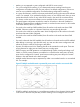
Syntax:
show mesh traceroute mac-address MAC-addr vlan vid
Traces the route from a source switch in a mesh to a device connected to the mesh.
MAC-addr MAC address of the target device.
vid VLAN number of the mesh, between 1 and 4094.
Hop The hop count of the trace, beginning at 0.
Address The base MAC address of the switch involved in the hop.
Hostname The hostname of the switch involved in the hop.
Inbound-Port The number of the port through which the trace enters the
switch.
Outbound-Port The number of the port through which the trace exits the
switch.
The direction of the trace is from the originating switch to the target device.
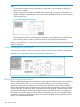
Example 137 Viewing traceroute information
For the example mesh topology shown in Example 135 (page 176), the following switch mesh
traceroute command traces the route to the client attached to the South switch.
North#: show mesh traceroute mac-address 001517-0bdc0c vlan 1
Traceroute to MAC Address: 001517-0bdc0c VID: 1
Hop Address Hostname Inbound-Port Outbound-Port
0 0024a8-d60b80 North 13
1 001560-f9e300 East A13 A14
2 001f28-244a00 South C14 A1
Trace route is completed. Total hops to destination is 3
NOTE: In this case the trace traverses two links (North-to-East and East-to-South), rather than
going directly from the North switch to the South switch. The mesh chooses the route based on
traffic loads on the links and other factors. As a result, the mesh may choose different paths between
any two points at different times. You may notice these differences when you trace routes through
the mesh.
Viewing switch mesh status 177