
Advanced Traffic Management Guide K/KA/KB.15.15




NOTE:
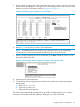
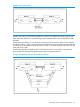
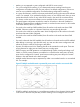
• A switch mesh domain cannot include either a switch that is not configured for meshing, or
other sources of traffic.
• Where a given pair of switches are linked with meshed ports, you must not also link the pair
together through non-meshed ports unless you have also enabled STP, RSTP, or MSTP to prevent
a loop from forming.
Figure 28 A unsupported topology
• The switch blocks traffic on a meshed port connected to a non-meshed port on another switch.
• Switch meshing does not allow trunked links (LACP or Trunk) between meshed ports.
Linking a non-mesh device or port into the mesh causes the meshed switch ports connected to that
device to shut down.
Using a heterogeneous switch mesh
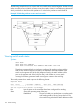
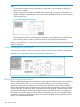
You can use the switches covered in this guide with the HP Switch Series 5300xl in normal mode.
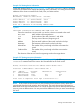
Example 139 A supported heterogeneous topology in normal mode
Bringing up a switch mesh domain
When a meshed port detects a non-meshed port on the opposite end of a point-to-point connection,
the link will be blocked. Thus, as you bring up switch meshing on various switches, you may
temporarily experience blocked ports where meshed links should be running. These conditions
should clear themselves after all switches in the mesh have been configured for meshing and their
switches rebooted. To reduce the effect of blocked ports during bring-up, configure meshing and
reboot the switches before installing the meshed switches in the network. Also, since adding (or
removing) a meshed port requires a switch reboot to implement, you can avoid repeated system
disruptions by waiting to implement the mesh until you have finished configuring meshing on all
ports in your intended mesh domain.
180 Switch meshing