
Advanced Traffic Management Guide K/KA/KB.15.15

6 Quality of Service: Managing bandwidth effectively
NOTE: All commands previously in the Summary of commands table are indexed under the entry
Command syntax.
Overview
A Quality of Service (QoS) network policy refers to the network-wide controls available to:
• Ensure uniform and efficient traffic-handling throughout your network, while keeping the most
important traffic moving at an acceptable speed, regardless of current bandwidth usage.
• Exercise control over the priority settings of inbound traffic arriving in and travelling through
your network.
Adding bandwidth can be a good idea, but is not always feasible and does not completely
eliminate the potential for network congestion. There will always be points in the network where
multiple traffic streams merge or where network links change speed and capacity. The impact and
number of these congestion points will increase over time as more applications and devices are
added to the network.
When network congestion occurs, it is important to move traffic on the basis of relative importance.
However, without Quality of Service (QoS) prioritization, less important traffic consumes network
bandwidth and slows down or halts the delivery of more important traffic. Without QoS, most
traffic received by the switch is forwarded with the same priority it had upon entering the switch.
In many cases, such traffic is normal priority and competes for bandwidth with all other
normal-priority traffic, regardless of its relative importance to your organization's mission.
Using QoS to classify and prioritize network traffic
Quality of Service is used to classify and prioritize traffic throughout a network. QoS enables you
to establish an end-to-end traffic-priority policy to improve the control and throughput of important
data. You can manage available bandwidth so that the most important traffic goes first. For
example, you can use Quality of Service to:
• Upgrade or downgrade traffic from various servers.
• Control the priority of traffic from dedicated VLANs or applications.
• Change the priorities of traffic from various segments of your network as your business needs
change.
• Set priority policies in edge switches in your network to enable traffic-handling rules across
the network.
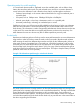
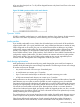
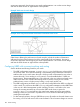
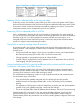
Figure 30 802.1p priority based on CoS (Class-of-Service) types and use of VLAN tags
188 Quality of Service: Managing bandwidth effectively