
Advanced Traffic Management Guide K/KA/KB.15.15

Classifier-based QoS policies provide greater control for managing network traffic. Using multiple
match criteria, you can finely select and define the classes of traffic that you want to manage.
QoS-specific actions determine how you can handle the selected traffic.
Configuring QoS globally
To globally configure a QoS policy on the switch, follow these steps:
1. Determine the global QoS policy to implement on the switch by analyzing the types of traffic
flowing through the network and identifying one or more traffic types to prioritize. The order
of precedence in which global QoS classifiers are applied, from a (highest) to h (lowest), is
as follows:
a. TCP/UDP applications.
b. Device priority—IP source or destination address. Destination has precedence over source.
c. IP precedence bit set (leftmost three bits in the ToS/Traffic Class field of IP packets).
d. IP differentiated services bit set (leftmost six bits in the ToS/Traffic Class field of IP packets).
e. Layer-3 protocol.
f. VLAN ID. At least one tagged VLAN is required on the network.
g. Source port.
h. Incoming 802.1p priority (requires at least one tagged VLAN on the network).
Default: In a tagged VLAN environment, the incoming 802.1p priority is used as the
default QoS classifier if no global QoS classifier with a higher precedence matches.
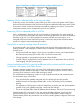
2. Select the global QoS classifier to use. The following table shows the types of QoS marking
(802.1p priority or DSCP codepoint) supported by each global QoS classifier.
Table 14 QoS marking supported by global QoS classifiers
Type of QoS marking used to prioritize outbound trafficGlobal QoS
classifiers
DSCP policy
2
– DSCP codepoint with 802.1p
priority
802.1p Priority
1
only
SupportedSupportedUDP/TCP
SupportedSupportedIP Device
Not SupportedSupported
3
IP Precedence
SupportedSupportedIP DiffServ
Not SupportedSupportedL3 Protocol
SupportedSupportedVLAN ID
SupportedSupportedSource Port
1
When you configure only the 802.1p priority to mark packets that match a global QoS classifier, the selected
traffic is prioritized and sent to the corresponding outbound port queue on the switch. VLAN-tagged ports are
necessary to carry the 802.1p priority in a packet header to downstream devices.
2
When you configure a DSCP policy to mark packets that match a global QoS classifier, the selected traffic is also
prioritized according to the associated 802.1p priority and sent to the corresponding outbound port queue on the
switch. VLAN-tagged ports carry the 802.1p priority in a packet header to downstream devices. In addition, you
can configure downstream devices to read the DSCP value in IP packets and implement the service policy implied
by the codepoint.
3
When using a global QoS IP Precedence classifier, the 802.1p priority is automatically assigned to matching
packets based on the IP precedence bit set in the packet header.
3. For 802.1p priority settings to be included in outbound packets, ensure that tagged VLANs
are configured on the appropriate downstream links.
190 Quality of Service: Managing bandwidth effectively