
Advanced Traffic Management Guide K/KA/KB.15.15

4. Configure the switch to assign the DSCP policy to packets with the specified TCP or UDP port
number or range of port numbers.
Syntax:
qos [ udp-port | tcp-port ] [ ipv4 | ipv6 | ip-all ]
[ port-number | range start end ] dscp codepoint
Assigns a DSCP policy to outbound packets having the specified TCP or UDP
application-port number or port range, and overwrites the DSCP in these packets
with the assigned codepoint value, where:
• ipv4 marks only IPv4 packets (default).
• ipv6 marks only IPv6 packets.
• ip-all marks all IP traffic (both IPv4 and IPv6 packets).
• port-number specifies a TCP/UDP port-number from 1 to 65535.
• range start end specifies a range of TCP/UDP ports. If you specify a
range, the minimum port number must precede the maximum port number in
the range.
• dscp codepoint overwrites the DSCP codepoint in the IPv4 ToS byte or
IPv6 Traffic Class byte of matching packets with the specified value.
Valid values for the DSCP codepoint are as follows:
• A binary value for the six-bit codepoint from 000000 to 111111.
• A decimal value from 0 (low priority) to 63 (high priority) that corresponds
to a binary DSCP bit set
• An ASCII standard name for a binary DSCP bit set
Enter ? to display the list of valid codepoint entries.
The DSCP value you enter must be currently associated with an 802.1p
priority in the DSCP Policy table. The 802.1p priority and determines the
packet's queue in the outbound port to which it is sent. If the packet leaves
the switch on a tagged port, it carries the 802.1p priority with it to the
next downstream device.
The default DSCP codepoint is No-override. The DSCP codepoint is
not overwritten in matching packets.
The no form of the command deletes the specified UDP or TCP port number
or range of port numbers as a QoS classifier. If you configured a range
of port numbers as the QoS classifier, you must enter the entire range in
the no command; you cannot remove part of a range.
Syntax:
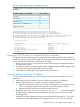
show qos tcp-udp-port-priority
Displays a listing of all TCP and UDP QoS classifiers currently in the running-config
file.
194 Quality of Service: Managing bandwidth effectively