
Advanced Traffic Management Guide K/KA/KB.15.15

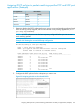
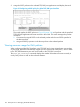
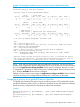
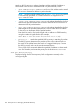
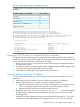

Example 147 Viewing the hardware resources used by currently configured QoS policies
HP Switch(config)#: show qos resources
Resource usage in Policy Enforcement Engine
| Rules | Rules Used
Slots | Available | ACL | QoS | IDM | VT | Mirror | PBR | Other |
------+-------------+-----+-----+-----+-----+--------+-----+-------|
A | 3014 | 15 | 11 | 0 | 1 | 0 | 0 | 3 |
| Meters | Meters Used
Slots | Available | ACL | QoS | IDM | VT | Mirror | PBR | Other |
------+-------------+-----+-----+-----+-----+--------+-----+-------|
A | 250 | | 5 | 0 | | | | 0 |
| Application |
| Port Ranges | Application Port Ranges Used
Slots | Available | ACL | QoS | IDM | VT | Mirror | PBR | Other |
------+-------------+-----+-----+-----+-----+--------+-----+-------|
A | 14 | 2 | 0 | 0 | | 0 | 0 | 0 |
0 of 8 Policy Engine management resources used.
Key:
ACL = Access Control Lists
QoS = Device & Application Port Priority, QoS Policies, ICMP rate limits
IDM = Identity Driven Management
VT = Virus Throttling blocks
Mirror = Mirror Policies, Remote Intelligent Mirror endpoints
PBR = Policy Based Routing Policies
Other = Management VLAN, DHCP Snooping, ARP Protection, Jumbo IP-MTU,
Transparent Mode.
Resource usage includes resources actually in use, or reserved for future
use by the listed feature. Internal dedicated-purpose resources, such as
port bandwidth limits or VLAN QoS priority, are not included.
NOTE: ACLs and QoS policies share the same application port ranges. If a new QoS policy
specifies a port range that is already configured for one or more ACLs, the QoS column increases
by 1, but the Application Port Ranges Available column remains unchanged. Likewise, if an ACL
is configured for a port range on which a QoS policy is already applied, the ACL column increases
by 1, while the Available column remains unchanged.
Similarly, when you remove a port range, the Application Port Ranges Available column increases
only if the port range is not configured for an existing ACL or QoS policy on the switch.
Assigning a priority for a global IP-device classifier
This global QoS packet-marking option assigns an 802.1p priority to all IP packets that have the
specified IP address as either a source or destination. If both the source and destination addresses
match, the priority configured for the IP destination address has precedence.
Syntax:
qos device-priority [ ipv4-address | [ipv4 ]ipv4-address/mask-length ]
priority 0 - 7
qos device-priority [ ipv6-address | ipv6 ipv6-address/mask-length ]
priority 0 - 7
Assigning a priority for a global IP-device classifier 197