
Advanced Traffic Management Guide K/KA/KB.15.15

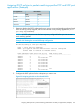
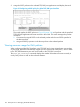
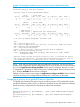
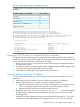

Example 148 Configuring and Viewing 802.1p priority
configuring and Viewing the 802.1p priority used to mark packets that match each global IP-device
classifier:
802.1p PriorityIP Address / Mask or Prefix Length
710.28.31.1
510.28.31.130
110.28.31.100/24
32001:db8:2:1:212:79ff:fe88:a100
12001:db8:3:3::/64
HP Switch(config)#: qos device-priority 10.28.31.1 priority 7
HP Switch(config)#: qos device-priority 10.28.31.130 priority 5
HP Switch(config)#: qos device-priority ipv4 10.28.32.100/24 priority 1
HP Switch(config)#: qos device-priority 2001:db8:2:1:212:79ff:fe88:a100 priority
HP Switch(config)#: qos device-priority ipv6 2001:db8:3:3::/64 priority 1
HP Switch(config)#: show qos device-priority
Device priorities
Device Address Apply rule | DSCP Priority
-------------------------------------------- ---------- + ------ -----------
10.28.31.1 Priority | 7
10.28.31.130 Priority | 5
10.28.32.100/24 Priority | 1
2001:db8:2:1:212:79ff:fe88:a100 Priority | 3
2001:db8:3:3::/64 Priority | 1
Assigning a DSCP policy for a global IP-device classifier
This global QoS packet-marking option assigns a previously configured DSCP policy (codepoint
and 802.1p priority) to outbound IP packets having the specified IP address or subnet mask in the
source or destination field of their packet header. The switch:
1. Selects an incoming IPv4 or IPv6 packet on the basis of the source or destination IP address
or subnet mask it carries.
2. Overwrites the DSCP in matching packets with the globally configured DSCP codepoint, and
assigns the 802.1p priority associated with the new DSCP.
3. Forwards the packet through the appropriate outbound port queue.
Creating a policy based on IP address
This procedure creates a DSCP policy for IP packets carrying the selected IP address (source or
destination).
1. Identify the IPv4 or IPv6 address to use as a classifier for assigning a DSCP policy.
2. Determine the DSCP policy for packets carrying the selected IP address:
a. Determine the DSCP you want to assign to the selected packets. (This codepoint will be
used to overwrite the DSCP carried in packets received from upstream devices.)
b. Determine the 802.1p priority you want to assign to the DSCP.
3. If necessary, use the qos dscp-map codepoint priority 0 - 7 command to configure
the DSCP policy (codepoint and associated 802.1p priority) that you want to use to mark
matching packets.
Prerequisite: A DSCP codepoint must have a preconfigured 802.1p priority (0 - 7) to use the
codepoint to mark matching packets. If a codepoint shows No-override in the Priority
Assigning a DSCP policy for a global IP-device classifier 199