
Advanced Traffic Management Guide K/KA/KB.15.15
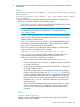
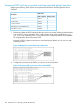
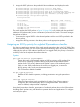
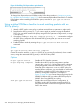
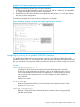
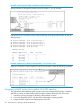

Figure 36 Enabling ToS IP-precedence prioritization
To change from IP-precedence to IP-Diffserv mode, follow the procedure in “Assigning a priority
for a global IP-device classifier” (page 197), which automatically disables IP-Precedence. To disable
IP-Precedence without enabling the IP-Diffserv option, enter the no qos type-of-service
command.
Using a global IP-Diffserv classifier to mark matching packets with an
802.1p priority
1. Identify a DSCP used to set a policy in packets received from an upstream or edge switch.
2. Determine the 802.1p priority (0 - 7) you want to apply to packets carrying the identified
DSCP. (You can either maintain the priority assigned in the upstream or edge switch, or assign
a new priority.)
3. If necessary, use the qos dscp-map codepoint priority 0 - 7 command to configure
the DSCP policy (codepoint and associated 802.1p priority) that you want to use to mark
matching packets.
4. Enable IP-Diffserv mode by entering the qos type-of-service diff-services
command.
Syntax:
qos type-of-service diff-services codepoint
Causes the switch to read the codepoint (DSCP) of an incoming IP packet and, when a match
occurs, assign the associated 802.1p priority in the DSCP Policy table.
Options
no qos type-of-service Disables all ToS classifier operation.
no qos dscp-map codepoint Disables direct 802.1p priority assignment to packets
carrying the codepoint , by reconfiguring the codepoint
priority assignment in the DSCP table to No-override.
Note that if this codepoint is in use as a DSCP policy for
another Diffserv codepoint, you must disable or redirect the
other Diffserv codepoint's DSCP policy before you can
disable or change the codepoint. For example, in
Figure 37 (page 205) you cannot change the priority for the
000000 codepoint until you redirect the DSCP policy for
000001 from using 000000 as a policy.
show qos type-of-service Displays the current Type-of-Service configuration. In
IP-Diffserv mode it also shows the current direct 802.1p
assignments and the current DSCP assignments covered
later in this section.
204 Quality of Service: Managing bandwidth effectively