
Advanced Traffic Management Guide K/KA/KB.15.15

Example 150 Configuring new DSCP policies
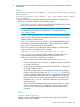
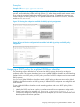
The following example shows how to configure new DSCP policies on matching packets with the
specified DSCP codepoints.
Policy Name
(Optional)
802.1p PriorityPolicy DSCPReceived DSCP
Level 66000010001100
Level 44000101001101
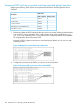
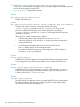
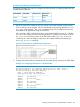
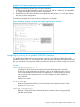
1. Determine if the DSCP codepoints that you want to use to mark matching packets already
have an 802.1p priority assigned, which could indicate use by existing applications (show
qos dscp-mapcommand). This is not a problem as long as the configured priorities are
acceptable for all applications using the same DSCP.
Also, note that a DSCP codepoint must have a preconfigured 802.1p priority (0 - 7) before
you can use the codepoint to mark matching packets. If a codepoint you want to use shows
No-override in the Priority column of the DSCP Policy table (show qos dscp-map
command), you must first configure a priority for the codepoint before proceeding (qos
dscp-map priority command).
Figure 39 Viewing the current DSCP-map configuration
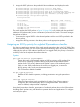
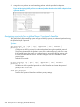
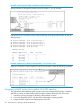
2. Configure the desired policies (codepoint and associated 802.1p priority) in the DSCP table:
Example 151 Configuring DSCP policies in the DSCP table
HP Switch(config)#: qos dscp-map 000010 priority 6 name 'Level 6'
HP Switch(config)#: qos dscp-map 000101 priority 4 name 'Level 4'
HP Switch(config)#: show qos dscp-map
DSCP -> 802.p priority mappings
DSCP policy 802.1p tag Policy name
----------- ---------- -----------------
000000 No-override
000001 No-override
000010 6 Level 6
000011 No-override
000100 No-override
000101 4 Level 4
000110 No-override
000111 No-override
Assigning a DSCP policy for a global IP-Diffserv classifier 207