
Advanced Traffic Management Guide K/KA/KB.15.15
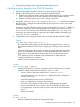
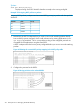

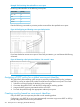
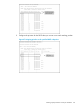

3. Assign the DSCP policies to the selected source-ports and display the result.
Figure 48 Viewing global source-port classifier with DSCP-priority marking
Configuring classifier-based QoS
To use the classifier-based model to configure a QoS policy and apply it to a selected class of
traffic on a port or VLAN interface, follow these steps:
1. Evaluate the types of traffic in your network and identify the traffic types that you want to
prioritize or rate limit.
2. Create an IPv4 or IPv6 traffic class using the class command to select the packets you want
to manage.
Context: Global configuration
Syntax:
[no] class ipv4 | ipv6 classname
Defines the name of a traffic class and specifies whether a policy is to be applied
to IPv4 or IPv6 packets, where classname is a text string (64 characters maximum).
After you enter the class command, you enter the class configuration context to
specify match criteria. A traffic class contains a series of match and ignore
commands, which specify the criteria used to classify packets.
A traffic class consists of match criteria, which consist of match and ignore commands.
• The match commands define the values that header fields must contain for a packet to
belong to the class and be managed by policy actions.
• The ignore commands define the values which, if contained in header fields, exclude
a packet from the policy actions configured for the class.
NOTE: Enter match/ignore statements in the precise order in which you want their
criteria to be used to check packets.
The following match criteria are supported in match/ignore statements for inbound IPv4/IPv6
traffic:
• IP source address (IPv4 and IPv6)
• IP destination address (IPv4 and IPv6)
• Layer 2 802.1Q VLAN ID
218 Quality of Service: Managing bandwidth effectively