
Advanced Traffic Management Guide K/KA/KB.15.15

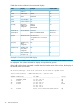
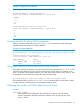

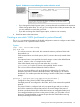

Example 7 Wrapping column headers
The total output wraps if it is longer than the terminal width; it is not truncated.
HP Switch(config)#: show vlan custom id
Status and Counters - VLAN Information - Custom view
VLANID
------
1
33
44
HP Switch(config)#: show vlan custom id:2
Status and Counters - VLAN Information - Custom view
VL
--
1
33
44
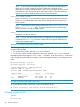
Creating an alias for show VLAN commands
Create an alias for a frequently used show vlans custom command to avoid entering the
selected columns each time you use the command.
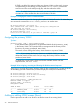
Example 8 Using a VLAN alias
HP Switch(config)#: alias showvlanstatus = “show vlan custom A1-A3 id name:20 status”
HP Switch(config)#: show vlan status
Status and Counters - VLAN Information - Custom view
VLANID VLAN name Status
------ -------------------- ----------
1 DEFAULT_VLAN Port-based
33 Vlan33 Port-based
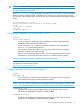
Using pattern matching with the show VLANs custom command
If a pattern matching command is in a search for a field in the output of the show vlan custom
command and it produces an error, the error message may not be visible. For example, if you
enter a command with the pattern matching include option that contains an error (such as 'vlan'
is misspelled) as in the following example, the output may be empty:
HP Switch(config)#: show vlans custom 1-3 name vlun include vlan1
HP recommends that you try the show vlans custom command first to ensure there is output,
and then enter the command again with the pattern matching option.
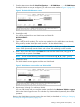
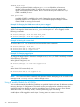
Changing the number of VLANs allowed on the switch
Syntax:
max-vlans 1-2048
In the default VLAN configuration, the switch allows a maximum of 256 VLANs.
Use this command to specify the maximum VLANs to allow, and specify any value
from 1 to 2048.
Creating an alias for show VLAN commands 23