
Advanced Traffic Management Guide K/KA/KB.15.15

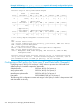


Syntax:
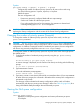
qos queue-config 2-queues | 4-queues | 8-queues
Configures the number of outbound priority queues for all ports on the switch using
one of the following options: 2-queues, 4-queues, or 8-queues.
Default: 8-queues
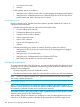
The new configuration will:
• Remove any previously configured bandwidth-min output settings
• Set the new number of outbound port queues
If you select anything but yes for this operation, the operation is aborted and
a message stating Operation aborted appears.
CAUTION: This command will execute a write memory followed by an immediate reboot,
replacing the Startup configuration with the content of the current Running configuration.
Changing the number of priority queues (Example)
To change the number of outbound priority queues for all ports on the switch, use the qos
queue-config command.
CAUTION: The qos queue-config command executes a write memory followed by an
immediate reboot, replacing the Startup configuration with the contents of the current Running
configuration. In addition to setting the number of outbound port queues, the new configuration
will remove any previously configured bandwidth-min output settings.
To change the number of outbound priority queues for all ports on the switch from eight queues
(the default) to four:
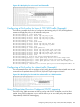
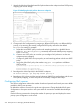
1. Configure the number of outbound priority queues by using the qos queue-config
command.
HP Switch(config)#: qos queue-config 4-queues
A caution message is displayed (see the Caution note above) concluding with the following
prompt.
Do you wish to proceed? [Proceed/Cancel]
2. Type Proceed to continue.
A second confirmation prompt appears:
Please confirm reset. [Yes/Cancel]
3. Type Yes to initiate a write memory followed by an immediate reboot. (If you enter Cancel
at either of the two prompts, the command is aborted and the current queue configuration is
maintained on the switch).
The changes will be committed to the startup configuration and the switch will reboot
automatically with the new priority queue changes in effect. See Table 26 (page 260) for a
listing of the default GMB percentages that are allocated per queue.
Viewing the QoS queue configuration
Syntax:
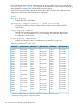
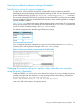
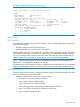
show qos queue-config
Displays the current priority queue configuration and memory allocations per queue.
For example:
Changing the number of priority queues (Example) 237