
Advanced Traffic Management Guide K/KA/KB.15.15


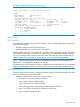

HP Switch#: show qos queue-config
802.1p
Queue Priority Memory %
----- -------- --------
1 1–2 10
2 0,3 70
3 4–5 10
4 6–7 10
Using the outbound queue monitor
NOTE: Outbound queue monitoring is not supported on HP 3800 switches.
When QoS is used to prioritize traffic, different kinds of traffic can be assigned to different egress
queues. If there is a great deal of traffic, it is desirable to be able determine if some traffic to the
lower priority queues was dropped. This feature allows the egress queues for one port to be
monitored for dropped packets.
Syntax:
[no] qos watch-queue port out
Configures the switch to start monitoring the specified port for the dropped packets
for each queue. Disabling and then re-enabling monitoring on a port clears the
per-queue dropped packet counters. For example:
HP Switch(config)#: qos watch-queue 5 out
The no form of the command stops the collection of dropped traffic information.
(Default: disabled)
Viewing per-queue counts
The show interface queues command displays the number of dropped packets for each
queue for the configured port. The port must have been configured with the qos watch-queue
command. Ports that have not been configured display zero values for the queue counts.
238 Quality of Service: Managing bandwidth effectively