
Advanced Traffic Management Guide K/KA/KB.15.15





command No-override means that the global QoS policy used to mark matching packets does
not assign an 802.1p value.
• IP packets received through a VLAN-tagged port are managed using the 802.1p priority they
carry in the 802.1Q field in their headers.
• VLAN-tagged packets received through an untagged port are handled by the switch with
normal priority.
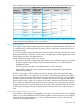
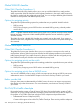
Example 164 Show QoS command output
“Viewing show qos output” (page 245)shows the global QoS configurations on the switch that
are configured with the VLAN ID classifier. Note that non-default 802.1p priorities have been
configured for VLAN IDs 22 and 33; packets received on VLAN 1 are managed with the default
settings, as described in the two bulleted items above.
Figure 53 Viewing show qos output
Global QoS restrictions
This table shows the packet types supported by different global QoS classifiers and DSCP marking.
Table 20 Restrictions for global QoS support
DSCP
overwrite
(re-marking)
Global QoS classifiersType of
packets
supported
Incoming
802.1p
Source PortVLAN IDLayer 3
Protocol
IP
Type-of-Service
IP DeviceTCP/UDP
YesNoNoNoNoYesYesYesIP packets
(IPv4 andIPv6
1
) only
YesYesYesYesYesYesYesYesLayer-2 SAP
encapsulation
1
Globally-configured QoS supports IPv6 packets starting in release K.14.01.
All switches
For explicit QoS support of IP subnets, HP recommends forcing IP subnets onto separate VLANs
and then configuring VLAN-based classifiers for those VLANs.
For devices that do not support 802.1Q VLAN-tagged ports
For communication between these devices and the switch, connect the device to a switch port
configured as Untagged for the VLAN in which you want the device's traffic to move.
Port tagging rules
For a port on the switch to be a member of a VLAN, the port must be configured as either Tagged
or Untagged for that VLAN. A port can be an untagged member of only one VLAN of a given
protocol type. Otherwise, the switch cannot determine which VLAN should receive untagged traffic.
About QoS 245