
Advanced Traffic Management Guide K/KA/KB.15.15


2. Configure a Manager password on the switch intended for commander. (The Commander's
Manager password controls access to stack Members.) For more on passwords, see the Access
Security Guide for your switch.
Making a switch a Commander
Syntax:
stack commander name-str
Assigns a stack name to a switch makes it a Commander and automatically creates
a stack.
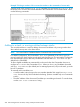
Example 171 Creating a Command switch
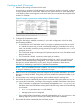
To create a Commander switch with a stack name of Big_Waters:
HP Switch(config)#: stack commander Big_Waters
NOTE: If stacking was previously disabled on the switch, this command also enables stacking.
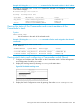
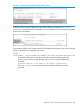
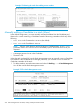
As the following show stack display shows, the Commander switch is now ready to add members
to the stack.
Using a Member’s CLI to convert the Member to be the Commander of a
new stack
This procedure requires that you first remove the Member from its current stack, then create the
new stack.
NOTE: If you do not know the MAC address for the Commander of the current stack, use show
stack to list it.
Syntax:
no stack
stack commander stack name
Making a switch a Commander 267