
Advanced Traffic Management Guide K/KA/KB.15.15

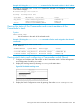
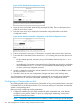
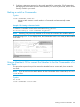
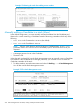

Example 172 Using a member's CLI to convert the member to the commander of a new stack
Suppose an HP switch named Bering Sea is a Member of a stack named Big_Waters. To use
the switch's CLI to convert it from a stack Member to the Commander of a new stack named "Lakes",
use the following commands:
Adding to a stack, or moving switches between stacks
You can add switches to a stack by adding discovered Candidates or by moving switches from
other stacks that may exist in the same subnet.
NOTE: You cannot add a Candidate that the Commander has not discovered.
In its default configuration, the Commander's Auto-Grab parameter is set to No to give you
manual control over which switches join the stack and when they join. This prevents the Commander
from automatically trying to add every Candidate it finds that has Auto Join set to Yes (the
default for the Candidate).
To allow eligible candidates to automatically join the stack when the Commander discovers it,
configure Auto Grab in the Commander to Yes. When you do so, any Candidate discovered
with Auto Join set to Yes (the default) and no Manager password, will join the stack, up to the
limit of 15 Members.
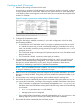
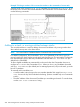
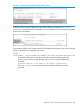
To manually add a candidate, use:
• A switch number (SN) to assign to the new member. Member SNs range from show stack
view. You can use any SN not included in the listing. (SNs are viewable only on a Commander
switch.)
• The MAC address of the discovered Candidate you are adding to the stack. To see this data,
use the show stack candidates listing.
268 Stack management for the 3500, 3500yl, 6200yl and 6600 switches