
Advanced Traffic Management Guide K/KA/KB.15.15

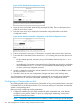
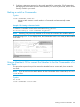
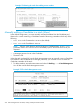

Example 173 Determining available switch numbers (SNs)
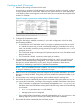
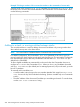
To display all discovered Candidates with their MAC addresses, execute the show stack
candidates command from the Commander's CLI. For example, to list the discovered candidates
for the above Commander:
Knowing the available switch numbers (SNs) and Candidate MAC addresses, proceed to manually
assign a Candidate to be a Member of the stack:
Syntax:
stack member switch-number mac-address mac-addr [ password password-str]
For example, if the switch in the above listing did not have a Manager password
and you want to make it a stack Member with an SN of 2, execute the following
command:
HP Switch(config)#: stack member 2 mac-address 0060b0-dfla00
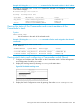
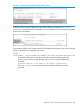
The show stack view command then lists the Member added by the above
command:
Adding to a stack, or moving switches between stacks 269