
Advanced Traffic Management Guide K/KA/KB.15.15


Moving a Member from one stack to another (Menu)
Where two or more stacks exist in the same subnet, it is easy to move a Member of one stack to
another stack if the destination stack is not full. This procedure is nearly identical to manually
adding a Candidate to a stack. If the stack from which you want to move the Member has a
Manager password, you will need to know it to make the move.
1. To move a Member from one stack to another, go to the Main Menu of the Commander in
the destination stack and display the Stacking Menu by selecting 9. Stacking...
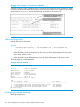
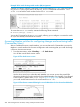
2. To learn or verify the MAC address of the Member you want to move, display a listing of all
Commanders, Members, and Candidates in the subnet by selecting 2. Stacking Status (All).
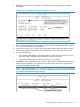
You will then see the Stacking Status (All) screen.
Figure 61 How the Stacking Status (All) screen helps you find member MAC addresses
3. In the Stacking Status (All) screen, find the Member switch that you want to move and note its
MAC address, then press B (for Back) to return to the Stacking Menu.
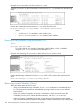
4. Display the Commander's Stack Management screen by selecting
4. Stack Management
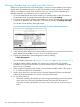
(For an example of this screen, see Example 175 (page 270) and Example 178 (page 275).)
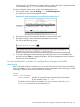
5. Press A (for Add) to add the Member. You will then see a screen listing any available
candidates. You will not see the switch you want to add because it is a Member of another
stack and not a Candidate.
6. Either accept the displayed switch number or enter another available number. (The range is
0 - 15, with 0 reserved for the Commander.)
7. Use the down arrow key to move the cursor to the MAC Address field, then enter the MAC
address of the desired Member you want to move from another stack.
8. Do one of the following:
• If the stack containing the Member you are moving has a Manager password, press the
down arrow key to select the Candidate Password field, then enter the password.
• If the stack containing the Member you want to move does not have a password, go to
step 9.
272 Stack management for the 3500, 3500yl, 6200yl and 6600 switches