
Advanced Traffic Management Guide K/KA/KB.15.15
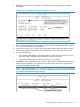

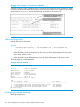
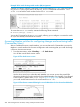

9. Press Enter to return to the Actions line, then press S (for Save) to complete the Add process
for the selected Member. You will then see a screen similar to the one in Example 175
(page 270) and Example 178 (page 275), with the newly added Member listed.
NOTE: If the message Unable to add stack member: Invalid Password appears
in the console menu's Help line, then you either omitted the Manager password for the stack
containing the Member or incorrectly entered the Manager password.
You can "push" a Member from one stack to another by going to the Member's interface and
entering the MAC address of the destination stack Commander in the Member's Commander
MAC Address field. Using this method moves the Member to another stack without a need
for knowing the Manager password in that stack, but also blocks access to the Member from
the original Commander.
Using auto join on a Candidate
In the default configuration, a Candidate's Auto Join parameter is set to Yes, meaning that it will
automatically join a stack if the stack's Commander detects the Candidate and the Commander's
Auto Grab parameter is set to Yes. You can disable Auto Join on a Candidate if you want to
prevent automatic joining in this case. There is also the instance where a Candidate's Auto Join
is disabled, for example, when a Commander leaves a stack and its members automatically return
to Candidate status, or if you manually remove a Member from a stack. In this case, you may want
to reset Auto Join to Yes.
Syntax:
[no] stack auto-join
Enables Auto Join on a Candidate.
The no version disables Auto Join on a Candidate.
Using a Candidate CLI to push the Candidate into a stack
Use this method if any of the following apply:
• The Candidate's Auto Join is set to Yes and you do not want to enable Auto Grab on
the Commander, or the Candidate's Auto Join is set to No.
• Either you know the MAC address of the Commander for the stack into which you want to
insert the Candidate, or the Candidate has a valid IP address and is operating in your network.
Syntax:
stack join mac-addr
mac-addr Specifies the MAC address of the Commander in the destination
stack.
If the Candidate has an IP address valid for your network use Telnet
or a direct serial port connection to access the CLI for the Candidate
switch.
Using auto join on a Candidate 273