
Advanced Traffic Management Guide K/KA/KB.15.15
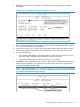
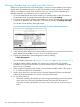

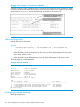
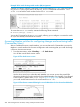

Example 178 Stack listing with two stacks in the subnet
Suppose you create a new Commander with a stack name of Cold_Waters and want to move
a switch named Bering Sea into this new stack:
You would then execute the following command to pull the desired switch into the new stack:
HP Switch(config)#: stack member 1 mac-address 0060b0-df1a00
Where 1 is an unused switch number (SN).
Since a password is not set on the Candidate, a password is not needed.
Use show stack all again to verify that the move took place.
Using a Member CLI to push the Member into another stack
Use the Member's CLI to push a stack Member into a destination stack if you know the MAC
address of the destination Commander.
Syntax:
stack join mac-addr
mac-addr Specifies the MAC address of the Commander in the destination
stack.
Converting a Commander to a Member of another stack
Syntax:
no stack name stack name stack join mac-address
Removes the Commander from a stack, eliminates the stack, and returns its Members
to the Candidate pool with Auto Join disabled.
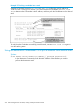
To identify the MAC address of the destination Commander, use the show stack all command.
Using a Member CLI to push the Member into another stack 275