
Advanced Traffic Management Guide K/KA/KB.15.15

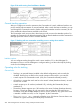

2. You can now make configuration changes and view status data for the selected Member in
the same way t you would if you were directly connected or telnetted into the switch.
3. When you finish accessing the selected Member, do the following to return to the Commander's
Stack Access screen:
a. Return to the Member's Main Menu.
b. Press 0 (for Logout), then Y (for Yes).
c. Press Return.
You should now see the Commander's Stack Access screen. (For an example, see Figure 63
(page 280) on Figure 67 (page 284).)
Disabling or re-enabling stacking
In the default configuration stacking is enabled on the switch. You can use the CLI to disable
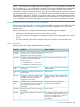
stacking on the switch at any time. Disabling stacking has the following effects:
Disabling a Commander Eliminates the stack, returns the stack Members to Candidates
with Auto Join disabled, and changes the Commander to a
stand-alone (non-stacking) switch. You must re-enable stacking
on the switch before it can become a Candidate, Member, or
Commander.
Disabling a Member Removes the Member from the stack and changes it to a
stand-alone (non-stacking) switch. You must re-enable stacking
on the switch before it can become a Candidate, Member, or
Commander.
Disabling a Candidate Changes the Candidate to a stand-alone (non-stacking) switch.
Syntax:
no stack
Disables stacking on the switch.
stack
Enables stacking on the switch.
Setting the transmission interval
All switches in a stack must be set to the same transmission interval to help ensure proper stacking
operation. HP recommends that you leave this parameter set to the default 60 seconds.
Syntax:
stack transmission-interval seconds
Managing a Candidate switch (Menu)
Perform these actions on a Candidate switch:
• Add (push) the Candidate into an existing stack.
• Modify the Candidate's stacking configuration (Auto Join and Transmission Interval).
• Convert the Candidate to a Commander.
• Disable stacking on the Candidate so that it operates as a standalone switch.
In its default stacking configuration, a Candidate switch can either automatically join a stack or
be manually added (pulled) into a stack by a Commander, depending on the Commander's Auto
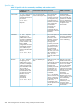
Grab setting. The following table lists the Candidate's configuration options:
Disabling or re-enabling stacking 281