
Advanced Traffic Management Guide K/KA/KB.15.15

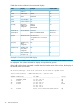
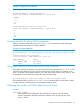
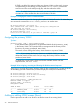
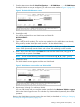


CAUTION: Prior to deleting a static VLAN, re-assign all ports in the VLAN to another VLAN.
Example 13 Deleting a static VLAN
Using Figure 3 (page 25), if ports B1-B5 belong to both VLAN 2 and VLAN 3, and ports B6-B10
belong to VLAN 3, deleting VLAN 3 causes the CLI to prompt you to approve moving ports B6 -
B10 to VLAN 1 (the default VLAN). (Ports B1-B5 are not moved because they still belong to another
VLAN.)
HP Switch(config)#: no vlan 3
The following ports will be moved to the default VLAN:
B6-B10
Do you want to continue?
[y/n] Y
HP Switch(config)#::
Converting a dynamic VLAN to a static VLAN
Syntax:
static-vlan vlan-id
Converts a dynamic, port-based VLAN membership to a static, port-based VLAN
membership (allows port-based VLANs only).
For this command,vlan-id refers to the VID of the dynamic VLAN membership.
Use show vlan to help identify the VID.
This command requires that GVRP is running on the switch and a port is currently
a dynamic member of the selected VLAN.
After you convert a dynamic VLAN to static, you must configure the switch's per-port
participation in the VLAN in the same way that you would for any static VLAN.
Example 14 Converting a dynamic VLAN to a port-based static VLAN
Suppose a dynamic VLAN with a VID of 125 exists on the switch. The following command converts
the VLAN to a port-based, static VLAN:
HP(config)#: static-vlan 125
Configuring static VLAN per-port settings
Syntax:
[no] vlan vid
This command, used with the options listed below, changes the name of an existing
static VLAN and the per-port VLAN membership settings.
NOTE: You can use these options from the configuration level by beginning the command with
vlan vid, or from the context level of the specific VLAN by just entering the command option.
tagged port-list
Configures the indicated port as Tagged for the specified VLAN. The no version
sets the port to either No or (if GVRP is enabled) to Auto.
untagged port-list
Configures the indicated port as Untagged for the specified VLAN. The no version
sets the port to either No or (if GVRP is enabled) to Auto.
Converting a dynamic VLAN to a static VLAN 29