
Advanced Traffic Management Guide K/KA/KB.15.15

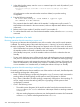

If both fragments are Inactive, then an election process occurs. The two (or more) Commanders in
the fragments are compared. The Commander is selected using the following criteria:
1. Highest Stack Rev
2. If the stack rev is the same for both, then choose the switch with the highest configured priority
3. If the priorities are the same for both, then choose the switch with the highest OS revision
4. If the OS revisions are the same, then choose the switch with the longest uptime
5. If the uptimes are the same, then choose the switch with the lowest MAC address
Modifying the stack topology
You can increase the efficiency and redundancy of the stack by adding stacking cables to create
a stacking mesh instead of a ring. This modification can be performed while the switches are
powered on and the stack is operating. After connecting the cables, enter the show stack
command. The Stack Topology field value displays the new topology.
NOTE: Transitioning between mesh and ring topologies temporarily leaves the stack in an
unsupported state (for example, when the stack is only connected to half of the additional ports).
If a failure occurs during this time, redundancy is not guaranteed.
Downloading new software to the stack
The stack is essentially a single switch with the Commander unit controlling the management
functionality, so the process of loading new software is identical to the process for a standalone
HP 3800. See the Management and Configuration Guide for your switch.
After new software is loaded on the Commander, the Commander installs the software on all the
stack members. The loading process can take some time.
To load the new software:
1. Load the new software onto the Commander via TFTP, USB, or Xmodem.
2. Once the new software is loaded, establish a console session with the stack and enter the
following command:
HP Stack 3800#: boot system
This causes the entire stack to be rebooted. Each unit is booted from its image unless
you specify otherwise with options to this command. Make sure that you boot from
the image to which you downloaded (that is, primary or secondary). If you add a
new member to an existing stack, the Commander updates the new switch’s software
to match the current stack software. Multiple versions of software are not supported
across stack members.
3. Confirm that the new software has been loaded on each stack member by entering the
member-context command for each member. From the stack member context, you can see
the switch software version that is running on that switch by entering the show flash or
show version command.
Syntax:
member-context stack-member
Sets the CLI context so that subsequent commands apply to the stack member that
is specified.
Monitoring stacking
Use the following commands to monitor the status and configuration of the stack.
298 Stack management for the 3800 switches