
Advanced Traffic Management Guide K/KA/KB.15.15



Interaction with other features
This feature affects management access to the switch as follows:
• IP—SNMP, Telnet, SSH, HTTP, TFTP, SCP, SFTP
• Routing—RIP, OSPF, PIM, VRRP
When the disable layer3 command is configured on a VLAN, the behavior is as if no IP
address were configured for that VLAN. There is no other change in behavior.
Syntax:
[no] disable layer3 vlan [ vid vid range]
In config context, turns off Layer 3 routing for the specified VLAN or VLANs. When
executed in vlan context, turns off Layer 3 routing for that VLAN.
The no form turns on Layer 3 routing for the specified VLAN or VLANs.
If QinQ is enabled, svlan can be configured as well.
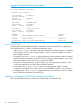
The show ip command displays disabled in the IP Config column if Layer 3 has been disabled,
or if the VLAN has no IP configuration. You can tell which is the case by viewing the remaining
columns; if there is no IP configuration, the remaining columns are blank.
Example 18 Viewing a VLAN disabled for Layer 3
HP Switch(config)#: show ip
Internet (IP) Service
IP Routing : Disabled
Default Gateway : 172.22.16.1
Default TTL : 64
Arp Age : 20
Domain Suffix :
DNS server :
VLAN | IP Config IP Address Subnet Mask Proxy ARP
-------------------- + ---------- --------------- --------------- ---------
DEFAULT_VLAN | DHCP/Bootp 172.22.18.100 255.255.248.0 No No
VLAN3 | Disabled 172.17.17.17 255.255.255.0 No No
VLAN6 | Disabled
VLAN7 | Manual 10.7.7.1 255.255.255.0 No No
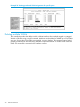
For IPv6, the Layer 3 Status field displays the status of Layer 3 on that VLAN.
Configuring static VLAN per-port settings 31