
Advanced Traffic Management Guide K/KA/KB.15.15
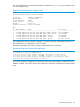
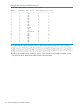
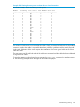


Example 209 Viewing a disabled stack port
HP Stack 3800$ show stacking stack-ports
Member Stacking Port State Peer Member Peer Port
------------------------------------------------------
1 1 Up 5 2
1 2 Up 2 1
1 3 Up 3 3
1 4 Up 4 3
2 1 Up 1 2
2 2 Up 3 1
2 3 Up 4 4
2 4 Up 5 3
3 1 Up 2 2
3 2 Down 0 0
3 3 Up 1 3
3 4 Up 5 4
4 1 Disabled 0 0
4 2 Up 5 1
4 3 Up 1 4
4 4 Up 2 3
5 1 Up 4 2
5 2 Up 1 1
5 3 Up 2 4
5 4 Up 3 4
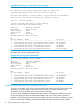
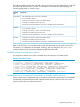
If the cable failure is more solid, the port is in the DOWN state. The logs show any transition.
I 10/07/00 06:01:15 02559 chassis: ST4-STBY: Stack port 3 is now off-line.I 10/07/00 06:01:16 02559 chassis:
ST3-CMDR: Stack port 3 is now off-line.I 10/07/00 06:01:16 02559 chassis: ST2-MMBR: Stack port 1 is now off-line.I
10/07/00 06:01:15 02559 chassis: ST5-MMBR: Stack port 2 is now off-line.I 10/07/00 06:01:15 02558 chassis:
ST2-MMBR: Stack port 1 is now on-line.I 10/07/00 06:01:12 02558 chassis: ST5-MMBR: Stack port 2 is now on-line.I
10/07/00 06:01:10 02558 chassis: ST4-STBY: Stack port 3 is now on-line.
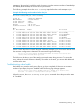
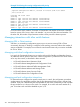
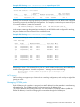
The following example shows member 3, port 2, which should be connected to member 4, port
1. The ports are down because the cable is bad or disconnected.
314 Stack management for the 3800 switches