
Advanced Traffic Management Guide K/KA/KB.15.15


The warning prompt is displayed only when there is at least one port in the port list that needs to
be moved out from the C-VLAN space to the S-VLAN domain. Similarly, if ports being added to
the C-VLAN are already members of an S-VLAN, the CLI issues a warning that the port's membership
with its existing VLANs will be removed and will prompt for a confirmation before continuing.
If all ports are just being added or removed from within the same VLAN type domain, no prompt
will appear. For example, moving ports from S-VLAN 200 to S-VLAN 300, will not result in any
warning as the ports are already part of the S-VLAN domain.
Moving ports between C-VLANs and S-VLANs (mixed VLAN mode)
A port (or trunk) that is a member of C-VLANs cannot be moved into the S-VLAN space with
conflicting configurations for the S-VLAN mode. The following is a list of conflicting
protocols/features. If a port has any of these enabled, the feature must be disabled before the port
can be moved in to the S-VLAN space.
• An interface has to beGVRP-disabled to move it from the C-VLAN to the S-VLAN space. This
is because S-VLANs of mixed VLAN mode do not support provider-GVRP, and also because
a GVRP-enabled configuration (when the port is a C-VLAN member) is in the context of
customer-GVRP which must be disabled before the port can operate in the S-VLAN space.
• Interface should not have any mirroring or monitoring sessions when moving between C-VLANs
and S-VLANs. All mirror/monitor sessions that involve the port must be unconfigured.
• An interface that has auth-vid or unauth-vid configuration cannot move into the S-VLAN space.
They have to be unset.
• Interfaces cannot have LACP enabled (active or passive modes) when moving into the S-VLAN
space. They have be disabled.
Viewing QinQ configuration and status
This section outlines changes and additions to existing show command outputs to display QinQ
configuration and status.
The show qinq command displays QinQ configuration information.
Syntax:
show qinq
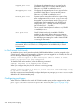
Shows QinQ global and port configurations on the switch, including:
Bridge-mode
cvlan bridge: QinQ is disabled, normal VLANs apply.•
• mixedvlan bridge: Both S-VLANs and regular C-VLANs are
available in a mixed VLAN mode environment.
• svlan: No regular VLAN commands are available. All
VLANs configured on the switch are S-VLANs only.
Tag-id: Displays only if QinQ is enabled on the switch.
port-type: Displays only if QinQ is enabled on the switch. On a mixed mode device,
port type is shown only for S-VLAN ports.
330 QinQ (Provider bridging)