
Advanced Traffic Management Guide K/KA/KB.15.15



Example 221 A policy configuration
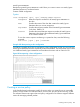
In the following QoS policy configuration, matching HTTP packets are rate limited to 10000 kbps.
All unmatched packets are managed by the default class, which assigns a slightly higher 802.1p
priority (4) and a new DSCP codepoint (5).
HP Switch(config)#: class ipv4 http
HP Switch(config-class)#: match tcp any any eq 80
HP Switch(config-class)#: match tcp any any eq 8080
HP Switch(config-class)#: exit
HP Switch(config)#: policy qos RateLimitPrioritizeSuspectTraffic
HP Switch(policy-qos)#: class ipv4 http action rate-limit kbps 10000
HP Switch(policy-qos)#: default-class action priority 4 action dscp 5
HP Switch(policy-qos)#: exit
A policy configuration requires a feature-specific policy command to identify the software feature
used to manage one or more traffic classes:
• To configure a QoS policy, use the policy qos command as described in the "Quality of
Service" chapter in the Advanced Traffic Management Guide.
• To configure a mirroring policy, use the policy mirror command as described in the
Management and Configuration Guide for your switch.
Creating a PBR policy
PBR provides the ability to manipulate a packet's path based on attributes of the packet. Traffic
with the same destination can be routed over different paths, so that different types of traffic, such
as VOIP or traffic with special security requirements, can be better managed.
NOTE: Policy Based Routing (PBR) is available on the 3800 Series switch and the 5400/8200
series switch which all have v2 or higher modules. Any v1 modules will prevent PBR from functioning.
PBR is not available on the 3500, 3500yl, 6200yl, nor 6600 Series switches.
The supported actions for PBR are:
• Setting the next hop for routing the packet ([ipv4 | ipv6] next-hop [ip-addr]).
• Setting the next hop for routing the packet if there is no explicit route for this destination ([ipv4
| ipv6] ip default-next-hop [ip-addr]).
• Setting the outbound tunnel interface for the packet (interface tunnel [tunnel-ID]).
See the IPv6 Configuration Guide for your switch.
• Setting interface null, which specifies that the packets are dropped if no other actions
have occurred.
Operating notes for PBR
• Multiple actions can be configured for a class, up to 8 actions per class.
• If you configure an action of interface null, no more actions for that class may be configured.
• Only one of the 8 possible actions can be active at one time.
• The precedence of actions is indicated by the order in which they are added to the policy.
• Actions can only be added to a class, and they are added to the end of the action list for the
class.
• To remove actions from a class, the entire class must be removed from the policy.
• When an action becomes inactive, for example, if the configured address becomes unreachable
(for next-hop and default-next-hop) or the interface goes down (for a tunnel), the
policy is configured with the next action for that class, if possible. If that action is not active,
358 Classifier-based software configuration