
Advanced Traffic Management Guide K/KA/KB.15.15



Example 224 Applying a QoS policy to a port range and a VLAN interface
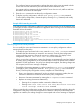
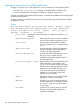
The following example shows how to apply a QoS policy to a port range and a VLAN interface:
HP Switch(config)#: interface a4 service-policy RateLimitPrioritizeSuspectTraffic in
HP Switch(config)#: vlan 10 service-policy RateLimitPrioritizeSuspectTraffic in
Checking resource usage
Syntax:
show policy resources
After applying service policies to an interface, use the show policy resources
command to verify the amount of additional resources used and the amount of
resources that are still available on the switch. Classifier-based service policies (such
as QoS or mirroring) share the same hardware resources with other software
features, such as ACLs, virus throttling, management VLAN, globally configured
QoS policies, MAC-based mirroring policies, and so on.
Use the displayed information to decide whether to re-prioritize current resource
usage by reconfiguring or disabling software features to free the resources reserved
for less important features. For a detailed explanation of the information displayed
with the show policy resources command, see the Management and
Configuration Guide.
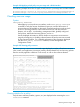
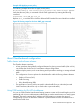
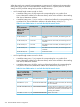
Example 225 Viewing policy resources
The show policy resources command output displays the number of hardware resources
(rules, meters, and application port ranges) used by classifier-based QoS and mirroring policies
that are currently applied to interfaces on the switch, as well as other software features.
Viewing statistics for a policy
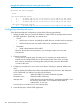
Only the active redirects (matches, ignores, etc.) are displayed when executing the show
statistics command.
Checking resource usage 363