
Advanced Traffic Management Guide K/KA/KB.15.15



Example 229 Applying a zone policy
The following example shows how to apply a zone policy:
HP Switch(config)#: zone-service-policy Firewall zone enable bind F1 appname
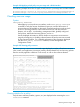
Verify that the zone policy is associated with the ONE application by entering the following
command:
hostswitch#: show ONE_app slot_ID
Replace slot_ID with the slot in which the AllianceONE Extended Services zl Module is installed.
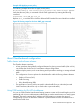
Figure 90 Viewing output for the show ONE_app command
About Classifier-based configuration
Traffic classes and software releases
The Classifier feature introduces:
• A finer granularity than globally configured features for placing network traffic (IPv4 or IPv6)
into classes that can be used in cross-feature software configurations
• Additional policy actions, such as rate limiting and IP precedence marking, to manage selected
traffic
• The configuration of service policies for classified traffic with the following software features:
Quality of Service (QoS)•
• Traffic mirroring
• Policy Based Routing (PBR)
• The application of service policies to specific inbound traffic flows on individual port and
VLAN interfaces (rather than only on switch-wide or port-wide traffic).
Using CIDR notation for IPv4/IPv6 addresses
You can use CIDR (Classless Inter-Domain Routing) notation to enter an IPv4 mask-length or an IPv6
prefix-length with a source and destination address that are used as match criteria in a match/ignore
statement. The switch interprets the IP address with CIDR notation to compute the range of
corresponding IP source or destination addresses in packet headers that are considered to be a
match for the traffic class.
About Classifier-based configuration 369