
Advanced Traffic Management Guide K/KA/KB.15.15




smart-link group 2 preemption-mode role
smart-link group 2 preemption-delay 15
Show commands
Smart link supports the following show commands.
Show smart link group
Show the Smart link group information. Detailed output is displayed if group is specified, otherwise
only basic information is displayed for all groups.
Syntax
HP-Switch# show smart-link group <group-id|all>
Show smart link flush-statistics
Show statistics of received flush packets.
Syntax
HP-Switch# show smart-link flush-statistics
Show receive control
Show receive control vlans configured on per port basis.
Syntax
HP-Switch# show smart-link recv-control-vlans
Clear command
clear group and flush statistics
Syntax
HP-Switch# clear smart-link <flush-statistics> group [group-id|all]
Overview
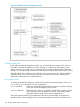
Smart link is a switch feature that provides effective, simple and fast-converging link redundancy
in network topology with dual uplink between different layers of the network. It requires an active
(master) and a backup (slave) link. The active link carries the uplink traffic. Upon failure of the
active link, a switchover is triggered and the traffic is directed to the backup link.
376 Smart Link