
Advanced Traffic Management Guide K/KA/KB.15.15
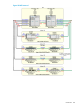
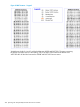

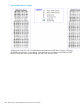
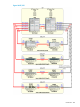
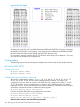
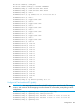


Figure 97 IST/CST Legend
VLANs that end with 7,8, and 9 are blocked between 8200A and WEST IDFs. The ports connecting
the 8200B and EAST IDFs are forwarding. Only if the active Trunk between the 8200B and EAST
IDFs fail will the links between the 8200A and WEST IDFs become active.
For consistency purposes configure the IST/CST to Block on the same ports as Instance 1. This way
you only have to remember two configurations.
Configurations
The following sections take you through the configurations of each switch for the example network.
HP 5406zl (IDF1WEST)
Configure the switch
HP Switch 5400zl> enable
HP Switch 5400zl#: config
Configure the trunks and VLANs on the switch
This switch is configured for VLANs 1, 3, 4, 5, 7, 8, 9, 23, 24, 25, 27, 28, 29, 33, 34, 35, 37,
38, 39, 43, 44, 45, 47, 48, and 49. When configuring MSTP instances, if a VLAN is not
configured you can not add it to instances. The Trunks are only configured for VLANs 1, 23, 24,
25, 27, 28, and 29. Set up a management IP on VLAN 1 and a default-gateway. Tag VLANs
supported on trunks. If your network requires more than 8 VLANs you will need to use max-VLANs
command to increase the number of VLANs the switch supports.
HP Switch 5400zl(config)#: max-vlans 50
Command will take effect after saving configuration and reboot.
HP Switch 5400zl(config)#: write memory
HP Switch 5400zl(config)#: reload
Device will be rebooted, do you want to continue [y/n]? Y
After the device reboots, enter the following commands:
386 Spanning tree interoperability between HP and Cisco switches