
Advanced Traffic Management Guide K/KA/KB.15.15
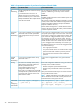

for switch management. In the default configuration, the Default
VLAN is also the Primary VLAN. However, any port-based,
non-default VLAN can be designated the Primary VLAN.
Secure Management VLAN This optional, port-based VLAN establishes an isolated network
for managing HP switches that support this feature. Access to
this VLAN and to the switch's management functions are
available only through ports configured as members.
Voice VLANs This optional, port-based VLAN type enables separating,
prioritizing, and authenticating voice traffic moving through
your network, avoiding the possibility of broadcast storms
affecting VoIP Voice-over-IP) operation.
NOTE: In a multiple-VLAN environment that includes older switch models there may be problems
related to the same MAC address appearing on different ports and VLANs on the same switch. In
such cases the solution is to impose cabling and VLAN restrictions.
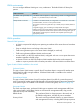
The default VLAN
Except for an IP address and subnet, no configuration steps are needed.
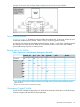
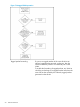
Example 35 A switch in the default VLAN configuration
Devices connected to these ports are in the same broadcast domain.
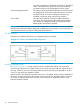
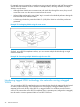
Multiple port-based VLANs
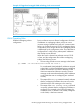
In Example 36 (page 45), routing within the switch is disabled (the default). This means that
communication between any routable VLANs on the switch must go through the external router. In
this case, VLANs W and X can exchange traffic through the external router, but traffic in VLANs
Y and Z is restricted to the respective VLANs.
Note that VLAN 1(the default) is present but not shown. The default VLAN cannot be deleted from
the switch, but ports assigned to other VLANs can be removed from the default VLAN. If internal
(IP) routing is enabled on the switch, then the external router is not needed for traffic to move
between port-based VLANs.
44 Static Virtual LANs