
Advanced Traffic Management Guide K/KA/KB.15.15
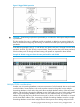
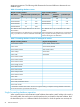
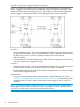
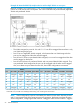
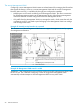
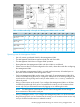
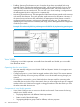

Figure 8 Tagged VLAN operation
CAUTION: Rate limiting may behave unpredictably on a VLAN if the VLAN spans multiple modules
or port-banks.
This also applies if a port on a different module or port-bank is added to an existing VLAN. HP
does not recommend configuring rate limiting on VLANs that include ports spanning modules or
port-banks.
In the following example, ports 2, 3, and 24 form one VLAN, with ports 1 through 24 in the same
port-bank. Ports 28, 29, and 32 form a second VLAN. These ports are also in the same port-bank,
which includes ports 25 through 48. Rate limiting will operate as expected for these VLANs.
Example 41 VLANs using ports from the same port-bank for each VLAN
Multiple VLAN considerations
Switches use a forwarding database to maintain awareness of which external devices are located
on which VLANs. Some switches, such as the switches covered in this guide, have a multiple
forwarding database, which means the switch allows multiple database entries of the same MAC
address, with each entry showing the (different) source VLAN and source port. Other switch models
have a single forwarding database, which allows only one database entry of a unique MAC
address, along with the source VLAN and source port on which it is found. All VLANs on a switch
use the same MAC address. Thus, connecting a multiple forwarding database switch to a single
forwarding database switch where multiple VLANs exist imposes some cabling and port VLAN
Introducing tagged VLAN technology into networks running untagged VLANs 51