
Advanced Traffic Management Guide K/KA/KB.15.15
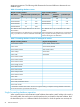
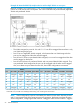
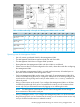
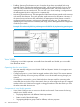

Table 6 VLAN membership in Example 46 “Management VLAN control in a LAN”
C8C6C3C2B9B5B4B2A7A6A3A1Switch
NNNYNNYYYNNY
Management VLAN
(VID = 7)
YYYNNNNNNNNN
Marketing VLAN
(VID = 12)
NNNNNNNNNYYN
Shipping Dept. VLAN
(VID = 20)
YYYYYYYYYYYY
DEFAULT-VLAN (VID
= 1)
Operating notes for Management VLANs
• Use only a static, port-based VLAN for the Management VLAN.
• The Management VLAN feature applies to both IPv4 and IPv6 traffic.
• The Management VLAN does not support IGMP operation.
• Routing between the Management VLAN and other VLANs is not allowed.
• If there are more than 25 VLANs configured on the switch, reboot the switch after configuring
the Management VLAN.
• If you implement a Management VLAN in a switch mesh environment, all meshed ports on
the switch will be members of the Management VLAN.
• Only one Management VLAN can be active in the switch. If one Management VLAN VID is
saved in the startup-config file and you configure a different VID in the running-config file, the
switch uses the running-config version until you either use the write-memory command or
reboot the switch.
• During a Telnet session to the switch, if you configure the Management VLAN to a VID that
excludes the port through which you are connected to the switch, you will continue to have
access only until you terminate the session by logging out or rebooting the switch.
NOTE: The Management VLAN feature does not control management access through a
direct connection to the switch's serial port.
• During a WebAgent session, if you configure the Management VLAN to a VID that excludes
the port through which you are connected to the switch, you will continue to have access only
until you close the browser session or reboot the switch.
Introducing tagged VLAN technology into networks running untagged VLANs 59