
Advanced Traffic Management Guide K/KA/KB.15.15






Heartbeat packets are sent at periodic intervals with a specific HP Switch unicast MAC address
in the destination field. This MAC address is assigned to the HP Switch and is not used by other
non-HP routers. Because the heartbeat packet contains a unicast MAC address, it does not interrupt
host operation. Even if you have multiple 1-65 Static Virtual LANs (VLANs) Introducing tagged
VLAN technology into networks running untagged VLANs HP switches connected to the network,
there is no impact on network performance because each switch sends heartbeat packets with its
configured MAC address as the destination address.
The format of a heartbeat packet is an extended Ethernet OUI frame with an extended OUI Ethertype
(88B7) and a new protocol identifier in the 5-octet protocol identifier field.
Operating notes
• The ip-recv-mac-address command allows you to configure only one MAC address for
a specified VLAN. If you re-enter the command to configure another MAC address, the
previously configured MAC address is overwritten.
• Enter the no form of the command to remove a configured MAC address and restore the
default MAC address of the HP switch.
• When you configure a VLAN MAC address, you may also specify a heartbeat interval. The
interval seconds parameter is optional.
• After you configure a VLAN MAC address:
IP router and MAC ARP replies to other VLAN devices contain the user-defined MAC
address as the Ethernet sender hardware address.
•
• Outbound VLAN traffic contains the HP Switch MAC address, not the configured MAC
address, as the source MAC address in packet headers.
• Immediately after you configure a VLAN MAC address or remove a configured MAC address,
a gratuitous ARP message is broadcast on the connected segment to announce the change of
the IP-to-MAC address binding to all connected IP-based equipment.
• A configured VLAN MAC address supports proxy ARP and gracious ARP.
• A new MIB variable, ifRcvAddressTable, is introduced to support VLAN MAC
configuration.
• You cannot configure a VLAN MAC address using the WebAgent or menu interface. You
must use the CLI.
• VRRP is not supported on a VLAN interface with a user-configured MAC address.
Example 48 Configuring a MAC address
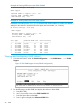
The following example shows how to configure a MAC address on VLAN 101.
HP Switch#: configure terminal
HP Switch(config)#: vlan 101
HP Switch(vlan-101)#: ip-recv-mac-address 0060b0-e9a200 interval 100
Correcting an unsupported configuration
The following scenario discusses an unsupported configuration.
The problem
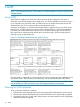
In Figure 9 (page 65), the MAC address table for Switch 8000M will sometimes record the switch
as accessed on port A1 (VLAN 1), and other times as accessed on port B1 (VLAN 2):
PC A sends an IP packet to PC B.
64 Static Virtual LANs