
Advanced Traffic Management Guide K/KA/KB.15.15





4. Determine security boundaries and how the individual ports in the segment will handle dynamic
VLAN advertisements. (See Table 7 (page 70) and Table 8 (page 75) )
5. Enable GVRP on all devices to be used with dynamic VLANs and configure the appropriate
"Unknown VLAN" parameter (Learn, Block, or Disable) for each port.
6. Configure the static VLANs on the switches needed, along with the per-VLAN parameters
(Tagged, Untagged, Auto, and Forbid—see Table 8 (page 75) )on each port.
7. Dynamic VLANs will now appear automatically, according to the configuration options you
have chosen.
8. Convert dynamic VLANs to static VLANs where dynamic VLANs need to become permanent.
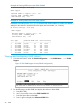
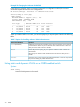
Viewing the switch's current GVRP configuration
Syntax:
show gvrp
Shows whether GVRP is disabled, along with the current settings for the maximum
number of VLANs and the current Primary VLAN.
Viewing the switch's current GVRP configuration 67