
Advanced Traffic Management Guide K/KA/KB.15.15






Example 49 Viewing GVRP status with GVRP disabled
HP Switch(config)#: show gvrp
GVRP support
Maximum VLANs to support [256] : 256
Primary VLAN : DEFAULT_VLAN
GVRP Enabled [No] : No
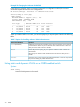
Example 50 Viewing GVRP status with GVRP enabled
Displayed is the listing for the show gvrp command with GVRP enabled. It includes non-default
settings for the Unknown VLAN field for some ports (see Port number 3, 4, 5 below).
HP Switch(config)#: show gvrp
GVRP support
Maximum VLANs to support [256] : 256
Primary VLAN : DEFAULT_VLAN
GVRP Enabled [No] : Yes
Port Type | Unknown VLAN Join Leave Leaveall
---- --------- + ------------ ----- ----- --------
1 10/100TX | Learn 20 300 1000
2 10/100TX | Learn 20 300 1000
3 10/100TX | Block 20 300 1000
4 10/100TX | Disable 20 300 1000
5 10/100TX | Disable 20 300 1000
6 10/100TX | Learn 20 300 1000
7 10/100TX | Learn 20 300 1000
Viewing and configuring GVRP (Menu)
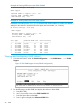
1. From the Main Menu, select: 2. Switch Configuration... —> 8. VLAN Menu... —> 1. VLAN
Support
Figure 12 The VLAN Support screen (default configuration)
2. Do the following to enable GVRP and display the Unknown VLAN fields:
a. Press E (for Edit).
b. Use ↓ to move the cursor to the GVRP Enabled field.
c. Press the Space bar to select Yes.
d. Press ↓ again to display the Unknown VLAN fields.
68 GVRP