
Advanced Traffic Management Guide K/KA/KB.15.15
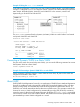
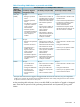

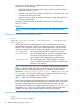

Example 53 Using the show vlans command
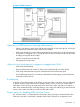
In the following illustration, switch B has one static VLAN (the default VLAN), with GVRP enabled
and port 1 configured to Learn for Unknown VLANs. Switch A has GVRP enabled and has three
static VLANs: the default VLAN, VLAN-222, and VLAN-333. In this scenario, switch B will
dynamically join VLAN-222 and VLAN-333:
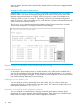
The show vlans command lists the dynamic (and static) VLANs in switch B after it has learned
and joined VLAN-222 and VLAN-333.
Switch-B> show vlans
Status and Counters - VLAN Information
VLAN support : Yes
Maximum VLANs to support : 8
Primary VLAN : DEFAULT_VLAN
802.1Q VLAN ID NAME Status
-------------- ------------- ------
1 DEFAULT_VLAN Static
222 GVRP_222 Dynamic
333 GVRP_333 Dynamic
Converting a Dynamic VLAN to a Static VLAN
If a port on the switch has joined a dynamic VLAN, you can use the following command to convert
that dynamic VLAN to a static VLAN:
static dynamic-vlan-id
Example 54 Converting a dynamic VLAN 333 to a static VLAN
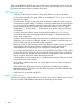
When converting a dynamic VLAN to a static VLAN as shown here, all ports on the switch are
assigned to the VLAN in Auto mode.
HP Switch(config)#: static 333
About GVRP
GVRP (GARP VLAN Registration Protocol) is an application of GARP (Generic Attribute Registration
Protocol.) It enables a switch to dynamically create 802.1Q-compliant VLANs on links with other
devices running GVRP, and automatically create VLAN links between GVRP-aware devices. (A
GVRP link can include intermediate devices that are not GVRP-aware.) This operation reduces the
chances for errors in VLAN configuration by automatically providing VID (VLAN ID) consistency
across the network. After the switch creates a dynamic VLAN, the CLI static vlan-id command
can be used to convert it to a static VLAN if desired. Also GVRP can be used to dynamically enable
port membership in static VLANs configured on a switch.
Converting a Dynamic VLAN to a Static VLAN 71