
Advanced Traffic Management Guide K/KA/KB.15.15

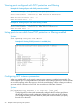

Example 57 Configuring BPDU filtering
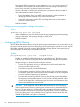
To configure BPDU filtering on port a9, enter:
HP Switch(config)#: spanning-tree a9 bpdu-filter
Viewing BPDU filtering
Syntax:
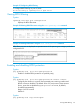
spanning-tree show port configuration
Displays the BPDU filter state.
Example 58 Viewing BPDU filter status using the show spanning tree command
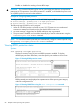
Example 59 Viewing BPDU filters using the show configuration command
BPDU filters per port are displayed as separate entries of the spanning tree category within the
configuration file.
Enabling and disabling BPDU protection
Syntax:
[no] spanning-tree port-list bpdu-protection
Enables or disables BPDU protection on specified port(s).
Syntax:
[no] spanning-tree port-list bpdu-protection-timeout timeout
Configures the duration in seconds when protected ports receiving unauthorized
BPDUs will remain disabled. The default value of 0 (zero) sets an infinite timeout
(that is, ports that are disabled by bpdu-protection are not, by default,
re-enabled automatically).
Range: 0-65535 seconds
Default: 0
Syntax:
[no] spanning-tree trap errant-bpdu
Viewing BPDU filtering 87